

First impressions are important
CMS projects can fail because the people expected to use the system don’t feel confident using it.
Imagine a marketer logging into Drupal, clicking Edit. They update a headline in place. They adjust a testimonial directly where it appears. They see familiar elements: Hero, Navbar, Testimonials, not unfamiliar jargon. When they drag-and-drop or click around, it’s fast.
In that first minute, they’re not evaluating Drupal’s flexibility or whether it can scale up. They’re deciding whether they feel comfortable using it, whether it’s speaking their language.
That initial impression can determine whether a CMS becomes a shared tool that will be embraced by different departments, or another tool that’s going to be a challenge to learn. Drupal Canvas changes that first impression for Drupal.
Canvas was designed to feel more like the tools marketers already use, with a clear “layers” view of page sections and simple controls for updating component content and settings.
Drupal CMS provides the structured foundation: preconfigured features, content models, and best-practice defaults that make Drupal easier to implement. Drupal Canvas is the visual editing experience within Drupal CMS. It is the interface marketers interact with every day. Instead of filling out backend forms, they edit directly on the page using structured components that follow the design system.
Under the hood, Canvas brings together different kinds of building blocks into one experience, including classic Drupal blocks and modern components built for design systems.
In simple terms, Drupal CMS provides the structure. Drupal Canvas is how marketers experience and edit that structure. The key difference is that Canvas supports experimentation without risk: it continuously saves your work as you go, but you still choose what to publish and when, including the option to schedule publishing.
What makes Drupal Canvas different from traditional page builders is that it’s built on Drupal’s structured architecture. Developers define reusable components aligned with your design system. Marketers assemble those components visually. Content remains structured, governed, and scalable across the platform. The editing experience feels modern, but the underlying system remains enterprise-grade.
What marketing teams are evaluating
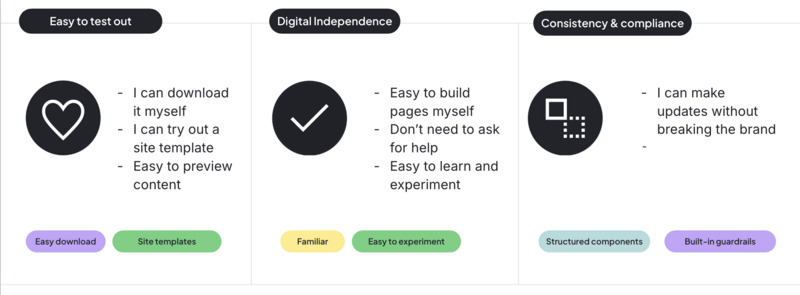
Most marketing teams have an unspoken checklist when they evaluate a CMS:
- Can I build what I need without getting help from a dev team?
- Can I move quickly?
- Can I experiment?
- Will I accidentally break the brand?
Drupal Canvas checks more of those boxes than the typical Drupal editing experience.
How autonomous can I be?
Out-of-the-box components support common narrative patterns: campaign pages, product highlights, landing pages. Teams can also reuse sections they’ve already built by saving them as patterns, then dropping those patterns onto new pages as a starting point.
That doesn’t eliminate the need for developers, but it does reduce dependency for everyday work. Developers still define the components and guardrails. Marketing teams assemble them. That separation of responsibilities keeps the system maintainable while giving teams greater independence
For many teams, that’s transformational.
It’s easy to evaluate
The two site templates available with Drupal CMS help marketers envision what a website could look like. Instead of having to imagine what’s possible, marketers see realistic layouts immediately. They can start modifying what’s there to evaluate Drupal Canvas.
Learning by doing
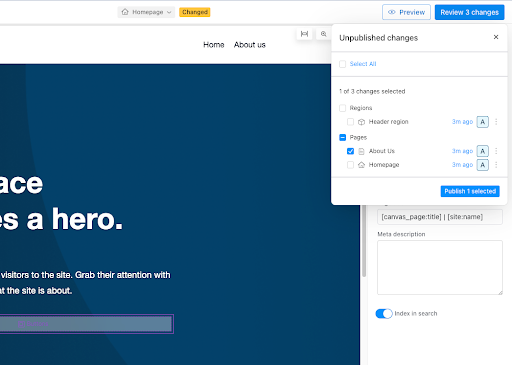
In-place editing is one of the most important features of Drupal Canvas. You click directly on content and edit it. The page updates immediately, so the feedback loop is fast. This facilitates experimentation and encourages marketers to learn. It also supports a more realistic workflow: you can make changes across multiple pages, then publish only what’s ready, without losing work-in-progress.
Flexibility with guardrails
Canvas relies on structured components and a design system embedded in templates. This creates guardrails like:
- Consistent spacing and layout
- Controlled styling
- Predictable behaviour
From a governance perspective, this contributes to brand consistency and accessibility compliance. What’s important for marketers is it creates autonomy (the feeling of being able to put together building blocks to tell a story) within constraints.
Canvas can also apply these principles globally, including shared regions like headers and footers, so updates don’t always require a developer ticket
Of course, this depends on how the components and themes are customized. There’s the opportunity to introduce inconsistency because content is still stored as structured Drupal entities, existing workflows, permissions, revisions, and moderation processes continue to apply. But the architecture supports good web governance.
Where marketing teams might need help
Some onboarding on Drupal Canvas is still a good idea. Here are some concepts that probably need an explanation:
Pages vs. Templates
Editing a page is intuitive. Editing a template raises bigger questions:
- What content will this change affect?
- Is this global?
- Why would I edit this instead of the page?
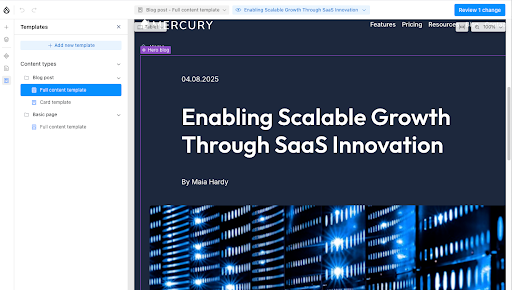
Developers understand display modes and template inheritance, but marketers probably don’t.
Getting everyone on the same page about how you’re using templates could be really valuable. Templates are how you build more consistency across content types.
Dynamic content listings
If a homepage includes a blog feed, it’s not always obvious that the content is dynamically aggregated. Marketers may try to edit what they see, not realizing it’s being pulled in automatically.
Once teams understand the difference between static content and aggregated content feeding a listing, they’ll feel more comfortable with how the whole system works.
Some settings still feel “Drupal”
Certain configuration panels — like Webform settings — still reflect Drupal’s technical heritage and the fact that marketers are getting exposed to a lot of flexibility through the Drupal Canvas interface.
Not every user needs to interact with these, and defining roles and permissions and/or training can help with this.
Adding components isn’t instantly obvious
The “+” icon lives in the left sidebar. For Drupal users, this is intuitive.
For marketers, that sidebar may feel structural or “advanced.”
A 30-second walkthrough during onboarding removes that hesitation entirely.
For a more technical deep-dive into the structured architecture, component definitions, and the future roadmap for Drupal CMS and Canvas, watch the Drupal for Everyone presentation from EvolveDigital NYC.
Why Drupal Canvas matters
If you’re building or maintaining Drupal sites, your success isn’t measured solely by code quality. It’s measured by adoption and users expect editing a website to be as easy as sending an email or updating a document. Drupal Canvas brings Drupal closer to the editing paradigms marketers already recognize: similar to modern visual builders and design tools.
It doesn’t oversimplify Drupal or remove the powerful content structure or extensibility. It does present the structure of your web pages in a much more visual way.
Now is a great time to start demoing Drupal Canvas and discussing it with your colleagues. Figure out how it can contribute to greater autonomy, improved governance, and the long-term vision for your website or platform.
Final thoughts
People don’t always select a CMS because it’s the best technical fit or has the strongest set of features. They pick the one that teams feel comfortable with, that they feel capable of owning.
Drupal Canvas moves Drupal meaningfully in that direction. And that’s why I’m excited about it!

