
Burrito Maker: How to Create Custom Fields in Drupal
A detailed tutorial on creating custom fields in Drupal using the field API.
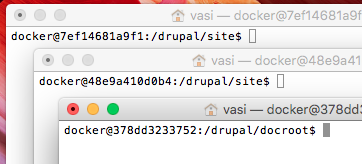
At Evolving Web we love using Docker! So when I needed to do work on several different sites, I just spun up a few Docker containers, and now I've got this:

Three shells in three different containers, and it's super hard to tell which is which.The hostnames are just random hex strings—so confusing!
Drupal has a powerful menu system, but most of the content on a typical Drupal website doesn't end up in the menu navigation. Articles, blog posts, events, you name it. Most content is linked to from views, not directly from a menu. So how do we make it easy for users to know where they are in the hierarchy of the site if they are looking at content that isn't in a menu?
This week, our client came up with a seemingly simple request that turned out not so simple: When listing events, they want to show upcoming events before past ones. Not only that, they also want events nearest the current day to show up first. But with a bit of thinking and a custom views sort plugin, this turned out quite easy!
Updated on June 15, 2022
You might think that using the drush command-line tool is only something hardcore developers do, but it turns out it's super-helpful for site builders and theme developers too! In my experience, using drush will speed up the usual Drupal Admin tasks 3 to 10 times, compared with visiting the Drupal admin pages in the browser.
We just upgraded our site to Drupal 8, and a big part of that was migrating content. Most content was in JSON files or SQL dumps, which are supported by Drupal's migrate module. But what about images and other files? How could we bring those along?
We'll show how to write a custom migrate process plugin!
Updated on June 15, 2022
This post is based on a talk I gave at DrupalCon Barcelona and this year at MidCamp. You can see a video version of the talk below.
I needed to create a new webform on a production site recently. But as a dev, I don't have direct access to the production admin backend; I'm only allowed to push code changes and let the client's team migrate them to prod via drush updb. So I'm supposed to export the webform configuration to code, and deploy it via an update hook, but how?
If you have a Drupal multilingual website, you've probably heard about the Entity Translation module, a module that allows you to translate fields in Drupal, instead of translating nodes. This means that instead of creating a node, taxonomy term, and user for each language on your site, you can create a single entity and translate the fields on it. The Entity Translation module includes a submodule that helps you upgrade to this new translation method.
The Web Experience Toolkit distribution of Drupal (aka WxT-Drupal, wetkit, or wet-boew) is a version of Drupal designed for organizations with a bilingual and accessibility requirements. Specifically, it's designed for Canadian government and public organizations. It has built with support for English and French, and includes a theme that provides accessibility and responsive support.
EvolveDigital est un sommet numérique destiné aux innovateurs numériques : développeurs, concepteurs, spécialistes du marketing et stratèges. Rejoignez-nous à Toronto le 6 mars.