

As organizations grow, so does their web ecosystem.
A university launches new department sites. A franchise expands into new regions. A corporation manages multiple brands. What starts as a single website quickly becomes five, ten, or fifty. Even if these sites look different, they usually share the same DNA—like the same design, the same tools, or the same management team. And at some point, leadership asks:
Are we managing all of this the right way?
A WordPress multisite network is one answer to that question. It is built for sites that belong together. But it’s not just a technical feature — it’s an architectural and governance decision that shapes how teams collaborate, how brands stay consistent, and how risk is managed.
Let’s unpack what multisite really means, how it works, and when it makes sense.
From isolated websites to a unified network
In a standard WordPress setup, each site is independent. It has its own codebase, its own database, its own themes and plugins. If you manage 20 sites, you likely maintain 20 separate WordPress environments.
That model works well when sites are truly unrelated. But it becomes inefficient when they share branding, design systems, or editorial workflows.
WordPress multisite changes the paradigm. Instead of spinning up a new WordPress installation for every site, you create a network of sites that all run from a single core installation.
These sites can be structured in different ways:
- As subdirectories (e.g., university.edu/engineering)
- As subdomains (e.g., law.university.edu)
- Or even as completely separate mapped domains (e.g., brandA.com, brandB.com)
To visitors, they may look entirely independent. Internally, they’re part of one shared system.
A good example of this is the CUPE project (the Canadian Union of Public Employees). Imagine if tens of individual local union chapters each had to manage their own independent websites, infrastructure, themes, and plugins. This would likely lead to a fragmented digital presence, where inconsistent designs fail to accurately represent the union's brand. For a model like this — where many branches need a unified identity — a multisite network is a great solution.
Under the Hood: Shared Code, Shared Infrastructure
The power of multisite comes from its architecture.
All sites in the network share the same WordPress core files, themes, and plugins. That means when you update WordPress core, you update it once for the entire network. The same applies to plugin updates and theme enhancements.
From a maintenance perspective, this is transformative. Instead of logging into dozens of dashboards to apply updates, teams manage a single codebase.
The database structure is shared as well, though with important nuances. By default, all sites live in one database. Some tables — like the users table — are global across the network. Others are duplicated per site and identified by a site ID (for example, wp_2_posts belongs to Site #2) .
This hybrid model allows each site to maintain its own content while still participating in a centralized system.
Governance and permissions: Central control, local autonomy
Multisite introduces a new level of governance through the Super Admin role.
If you think of the network as a business portfolio, the Super Admin acts as the portfolio manager. They control:
- Which sites exist
- Which themes and plugins are available
- Which users can access which sites
A single user is added to the network once, but can have different permissions on different sites. Someone might be an administrator for the Engineering site, an editor for the Research site, and have no access to the Law site.
For institutions like universities, franchise networks, or multi-department organizations, this model reflects real-world structures. Central IT or digital teams maintain control over infrastructure and standards, while departments retain autonomy over their content.
Design strategy: Enforcing standards without stifling flexibility
One of the most strategic advantages of multisite is how it supports design governance.
Using a parent and child theme structure, organizations can define a master design system in a parent theme, including layout rules, brand elements, and core functionality, and allow individual sites to layer in controlled variations through child themes. They can also use plugins to enable or disable specific features on individual sites within the network.
This approach achieves something that’s difficult in fully separate installations: consistency at scale.
If a header component is improved or a bug is fixed in the parent theme, that improvement cascades across every site instantly. Brand compliance becomes easier to enforce. Accessibility improvements can be rolled out network-wide. Design debt is reduced.
For large institutions concerned about brand drift across dozens of microsites, this alone can justify the architectural shift.
A higher education example
Higher education institutions are one of the clearest environments where WordPress multisite can deliver strategic value.
Colleges and universities rarely operate as a single, simple website. They manage multiple faculties, academic programs, recruitment campaigns, student services, and institutional initiatives — each with its own audience and content needs. At the same time, they must maintain strict brand standards, accessibility compliance, and centralized governance.
This is the type of ecosystem where a multisite architecture makes practical sense.
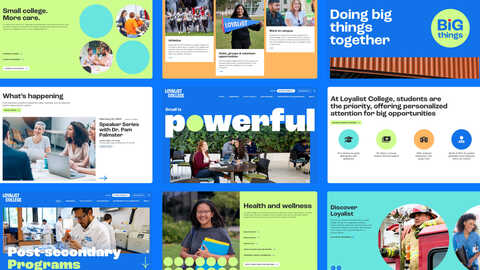
Evolving Web’s work with Loyalist College reflects this kind of digital complexity. The college needed to modernize its web presence while supporting diverse audiences across the institution. That meant improving usability, strengthening accessibility, and giving different teams the ability to manage their own content — all within a cohesive, consistent digital experience.
A multisite approach supports exactly this balance. The central digital team can manage core infrastructure, enforce a shared design system, and control updates across the network. Meanwhile, academic departments and internal stakeholders retain autonomy over their own content areas without breaking brand standards or introducing technical inconsistency.
One network, many identities
A common misconception is that multisite forces you into a specific, "technical" URL structure. In reality, you have full control over how your addresses look to the public.
There are three main ways to structure a network:
- Subdomains: Like site1.network.com.
- Subfolders: Like network.com/site1.
- Domain Mapping: This allows entirely separate top-level domains to point to different sites in the same network.
Consider a healthcare network that manages several distinct hospitals and services. Using a single multisite network, they could host their primary brand at healthnetwork.com and a specialized children’s hospital at childrenshospital.com. They might also use a subdomain like cardiology.healthnetwork.com for a specific service line or area of care.
To the customer, these are three unique websites. Behind the scenes, the development team manages everything — updates, security, and hosting — from one central dashboard.
This flexibility makes multisite particularly attractive for:
- Holding companies managing multiple distinct brands.
- Franchise systems using unique regional domains.
- Institutions running both public-facing and internal portals.
Shared content and cross-site experiences
Because the database is shared, multisite enables cross-site content aggregation in ways that isolated installations cannot easily replicate. However, unlocking this functionality requires custom development and careful architecture to avoid performance issues and unintended negative effects across the network.
Organizations considering more advanced cross-site integrations often benefit from experienced architectural guidance, particularly when performance, caching, and long-term maintainability are at stake. Evolving Web regularly works with teams to design and implement these kinds of multisite solutions in a structured, sustainable way.
For example, an intranet homepage could automatically pull the latest posts from HR, IT, and Communications into one unified feed. Global elements like a network-wide alert banner or footer can be controlled centrally but appear across every site.
This capability becomes especially powerful in organizations that want to balance departmental independence with enterprise-wide communication.
Efficiency and the responsibility that comes with it
From a project management perspective, multisite delivers operational efficiency. Updates are performed once for the entire network. Monitoring is centralized.
Maintenance overhead is reduced.
But this efficiency comes with risk.
If a plugin update introduces a conflict, it can affect every site simultaneously. If a vulnerability is exploited, the entire network is potentially exposed.
This is why staging environments, structured QA processes, and disciplined release management are not optional in multisite environments. They are essential.
Multisite amplifies both efficiency and risk. Governance maturity matters.
WordPress multisite vs. Drupal multisite
For organizations evaluating platforms, it’s worth noting a key architectural distinction.
Drupal multisite typically shares a codebase but uses separate databases for each site. WordPress multisite, by default, shares both the codebase and a single database.
There are ways to introduce database separation in WordPress (for example, we use tools like HyperDB when that’s necessary), but this adds complexity and still relies on shared global tables.
In practical terms, WordPress multisite implies tighter coupling between sites. That can be an advantage for standardization, but it requires thoughtful consideration when data isolation or regulatory compliance is a priority.
When multisite makes strategic sense
Multisite is particularly effective when:
- Multiple sites share a common brand identity
- Teams rely on the same design system and plugin stack
- There is centralized digital governance
- Operational efficiency across many similar sites is a priority
Universities, franchise networks, and enterprise intranets are common examples.
However, it’s not the right choice in every scenario. If sites represent completely unrelated clients, require strict data isolation, or have radically different technical needs, separate installations may be safer and more flexible and easy to maintain.
The bigger question
WordPress multisite is not just about managing more websites with fewer logins.
It’s about deciding how your organization balances centralization and autonomy.
Do you want tight brand governance or maximum independence? Is your digital ecosystem a collection of islands — or variations of a single platform?
When used strategically, multisite can unify systems, reduce maintenance, and scale governance. But when implemented without a clear strategy, it can lead to overengineering — introducing unnecessary complexity and risk.
The right decision depends not only on technical requirements, but on organizational maturity, security posture, and long-term digital strategy.
Conclusion
WordPress multisite is a strategic choice about how your organization structures, governs, and scales its digital presence. For the right use cases, it can simplify complexity and support collaboration within a shared framework. Its success depends on thoughtful planning, strong governance, and a clear understanding of your long-term goals.
If you’re managing a growing ecosystem of websites and wondering whether multisite is the right fit, we can help you evaluate your options and design a solution that balances efficiency, flexibility, and governance.
Get in touch with our team to start the conversation.

